Save Water Outline Icons: A Versatile Visual Toolkit for Water Conservation Messaging
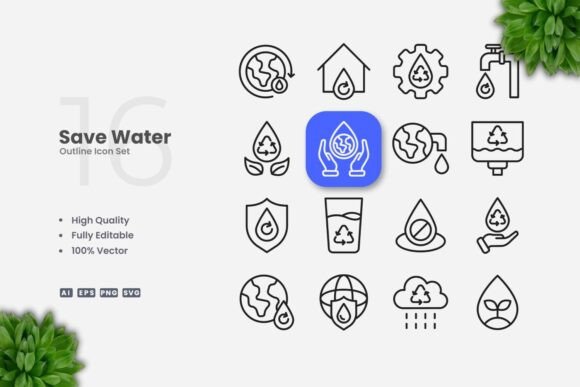
Water conservation is a global priority that demands clear, consistent communication. Whether you are designing a campaign for a nonprofit, creating educational materials for a school, or building a feature for a mobile app, the visuals you choose can make or break your message. That is where Save Water Outline Icons come in. This collection of vector icons offers a clean, simple design language that helps you communicate water-saving concepts without visual clutter. Because the icons are fully editable and scalable, they adapt seamlessly to almost any medium—from a social media post to a large-format poster. In this article, we explore what these icons are, why they matter for your projects, and how you can use them to create impactful, professional-looking materials that encourage water conservation.
Why Visual Consistency Matters for Water Conservation
Effective conservation messaging relies on instant recognition. When people see a dripping faucet, a rainwater barrel, or a shower head, they should immediately connect that image with an actionable idea: fix leaks, collect rainwater, take shorter showers. Inconsistent or cluttered icons can confuse audiences and dilute your message. Many organizations face the challenge of creating cohesive visual systems across different platforms. You might need icons for a website, a print flyer, a social media infographic, and a presentation—each requiring a different file format, size, or color scheme. Without a flexible icon set, you risk spending hours re-creating artwork or settling for mismatched visuals that weaken your campaign.
Another common challenge is ensuring that icons remain legible at various sizes. A detailed icon might look great on a poster but become a blurry mess on a mobile screen. Scalability is crucial, and so is the ability to adjust stroke weight and color without losing quality. Many stock icon sets lock you into a fixed style, making customization difficult. This is especially problematic when you need to align the icons with your brand’s color palette or adapt them for dark mode. Save Water Outline Icons address these pain points by providing a vector-based solution that you can edit on the fly.
How Save Water Outline Icons Solve Common Design Challenges
The core strength of Save Water Outline Icons lies in their inherent flexibility. Because the set includes files in AI, EPS, SVG, and PNG formats, you can work with them in virtually any design workflow. The vector nature means you never have to worry about resolution. Whether you scale an icon to 16 pixels for a mobile app button or 600 pixels for a banner, it remains crisp and clear. The editable stroke feature allows you to thicken or thin the lines to match your overall design style. For example, if your brand uses a bold, chunky aesthetic, you can increase the stroke weight in Adobe Illustrator or CorelDRAW with a single adjustment. If you prefer a more delicate, minimal look, you can reduce the stroke weight.
Color customization is equally straightforward. You can change the entire icon color, apply gradients, or even create multicolor variants. This eliminates the need to commission custom iconography for every new project. The 100% customizable nature of the set means you can reuse the same base icons across different campaigns, simply by tweaking the colors to match seasonal themes or target audiences. For instance, a blue palette with lighter tones might work for a general water awareness month, while high-contrast colors could be better for accessibility on a government website. You can also use the PNG transparency files for quick, no-edit deployments—perfect for social media managers who need to post immediately without opening design software.
Practical Applications Across Media
The versatility of Save Water Outline Icons makes them suitable for a wide range of real-world applications. Let’s walk through several scenarios where these icons can elevate your communication.
Websites and Mobile Apps
For websites, icons help users quickly scan and understand content. You might place a “Turn off the tap” icon next to a tip about brushing teeth without running water. On a mobile app that tracks household water usage, icons can represent different usage categories—shower, toilet, kitchen, garden. Using SVG files, you can embed icons directly in your code for fast loading and sharp rendering on retina displays. The icons’ clean outline style also works well with modern flat design and minimal UI trends, keeping the interface uncluttered and user-friendly.
Social Media and Infographics
Social media posts often need to grab attention within seconds. A simple outline icon combined with a strong statistic (like “A leaky faucet can waste 3,000 gallons per year”) creates an instantly shareable graphic. Because the icons are provided in PNG with transparency, you can drop them onto any background color without messy white boxes. For infographics, where you may have multiple visuals in a limited space, the uniform stroke weight of the set ensures a cohesive look. You can build a step-by-step guide (e.g., “Five ways to save water at home”) using the icons as visual anchors, making complex information easier to digest.
Print Materials: Flyers, Posters, and Banners
Print demands high-resolution artwork. The vector AI and EPS files allow you to output icons at any physical size—from a small flyer to a large billboard—without pixelation. For a community event promoting water conservation, you could design a poster featuring a central icon like a water droplet with an arrow recycling symbol, surrounded by smaller supporting icons. Since you control the stroke weight, you can ensure the icons remain visible even when printed on textured paper or at a distance. The Readme.txt file included in the package provides basic instructions, but the real power is in your hands: you can edit, combine, and transform the icons to fit your exact layout.
Books and Educational Materials
Educators and publishers can integrate these icons into worksheets, textbook illustrations, or digital learning modules. For instance, a children’s activity book about water conservation might use a funnel icon to represent “catching rainwater” and a hand icon for “washing with a bucket.” The outline style is approachable and less intimidating than highly detailed illustrations, making it suitable for all age groups. And because you can edit the stroke, you can adjust the icons for younger children by making them thicker and more cartoon-like, or keep them sleek for older students.
Tips for Customizing Your Icon Set
To get the most out of Save Water Outline Icons, start by opening the AI or EPS file in your preferred vector software. Here are a few practical recommendations:
- Resize with care: When scaling icons, avoid extreme disproportionality. While vectors can scale arbitrarily, maintaining consistent proportions ensures that the icons look harmonious when used together.
- Edit stroke weight globally: If you are using a program like Illustrator, you can select all icons and adjust the stroke weight at once. This saves time and enforces uniformity across your project.
- Use color but stay accessible: Changing colors is easy, but ensure sufficient contrast for visibility. For accessibility, aim for a contrast ratio of at least 4.5:1 against the background. A dark blue or dark green on white is both thematic and readable.
- Combine with text: Icons work best when paired with clear labels or short explanations. For a flyer, you might place an icon inside a circle and include a one-line caption beneath it.
- Export for specific platforms: For web use, export as SVG or optimized PNG. For print, use EPS or AI with CMYK color mode if needed. The package already includes SVG and PNG files, but you can regenerate them at custom sizes.
These tips help you adapt the icons to your specific needs without starting from scratch. The goal is to maintain a consistent visual language while tailoring elements like color and thickness to the medium.
Who Benefits from These Icons and How
Different users will approach Save Water Outline Icons based on their unique context. A graphic designer working for an environmental agency might leverage the full vector files to create a comprehensive brand kit. They could combine multiple icons into a single graphic, adjust stroke weights to match the agency’s existing iconography, and export a series of themed icon sets for different campaigns. The 100 Vector guarantee means there is a wide variety to choose from, covering actions like taking shorter showers, fixing leaks, using a broom instead of a hose, and collecting rainwater.
On the other hand, a social media manager with limited design experience might rely on the pre-exported PNG files. The transparent background allows them to quickly drag and drop icons into tools like Canva or Photoshop. They can resize without worrying about background artifacts, and they can apply basic color overlays using simple layer effects. This saves time and reduces the need for specialized training. Similarly, a teacher who wants to create a quick bulletin board display can print the PNGs directly or import them into a word processor. The icons add a professional touch without requiring any graphic design skills.
Small business owners, such as those running eco-friendly plumbing services or water filtration companies, can use these icons on their websites and marketing collateral. By consistently using the same icon style, they reinforce their brand’s commitment to sustainability. Nonprofit organizations planning a community water conservation fair can produce flyers, banners, and handouts that look like they came from the same design studio—because they did: the same versatile icon set.
Making the Most of Your Icon Investment
When you purchase Save Water Outline Icons, you are not just buying a set of pictures. You are acquiring a toolkit that can be reused indefinitely across projects. Because the files are vector-based and editable, they are a long-term asset. You can store the AI source file in your design library and pull icons as needed for years to come. The included Readme.txt provides simple file descriptions and usage notes, making it easy for anyone on your team to get started. And because the set is designed by Upnowgraphic, you can trust that the icons follow a consistent aesthetic: clean, modern, and focused on clarity.
Water conservation is an urgent global issue, but communicating about it effectively is a challenge. By using a unified visual language—one that is simple, scalable, and customizable—you remove barriers to understanding and action. Save Water Outline Icons help you focus on your message rather than on technical design hurdles. Whether you are creating a single social media graphic or developing a full-scale awareness campaign, these icons give you the flexibility to adapt and the confidence that your visuals will be sharp, professional, and impactful.
Start by exploring the included files. Open the SVG in a browser to preview, or drop a PNG into your next design project. As you grow comfortable, dive into the vector source files and experiment with color, stroke weight, and composition. The more you use the set, the more you will discover new ways to integrate water conservation imagery into your work. With every icon you place, you are not just decorating a page—you are helping people visualize a more water-wise future.